How to print a whole WhatsApp conversation (with photos and dates)
WhatsApp has no print button, and screenshots lose the dates and turn into hundreds of images. The reliable way, on Android and iPhone: export the chat from WhatsApp itself, open that file free in your browser, and save a PDF with every exported message, its date, its time and the photos in place. Then print it like any PDF.
Step 1: export the chat from WhatsApp (2 minutes)
Android: open the chat, tap the three dots › More › Export chat › Include media (for the photos), and save it to your phone, Drive or email. iPhone: open the chat, tap the contact’s name › Export chat › With all media, and save it to Files or email it to yourself. iPhone saves a .zip. Android saves a .txt and, with media, the photos as separate files next to it (sometimes a .zip); WhatsApp’s Android help says only the most recent media are attached, so older photos can be missing. WhatsApp’s help page describes the export; from WhatsApp Web or the desktop app you can also export, but without photos.
If your export came without photos: WhatsApp export has no photos?.
Step 2: open the chat in your browser, free
Open the WhatsApp chat viewer, add the .zip, or the .txt together with its photo files (on a phone, long-press in the file picker to select them all), and read the whole exported conversation in order, with the photos that were exported. It works on a computer or on the phone, and nothing is uploaded: the file never leaves your browser.
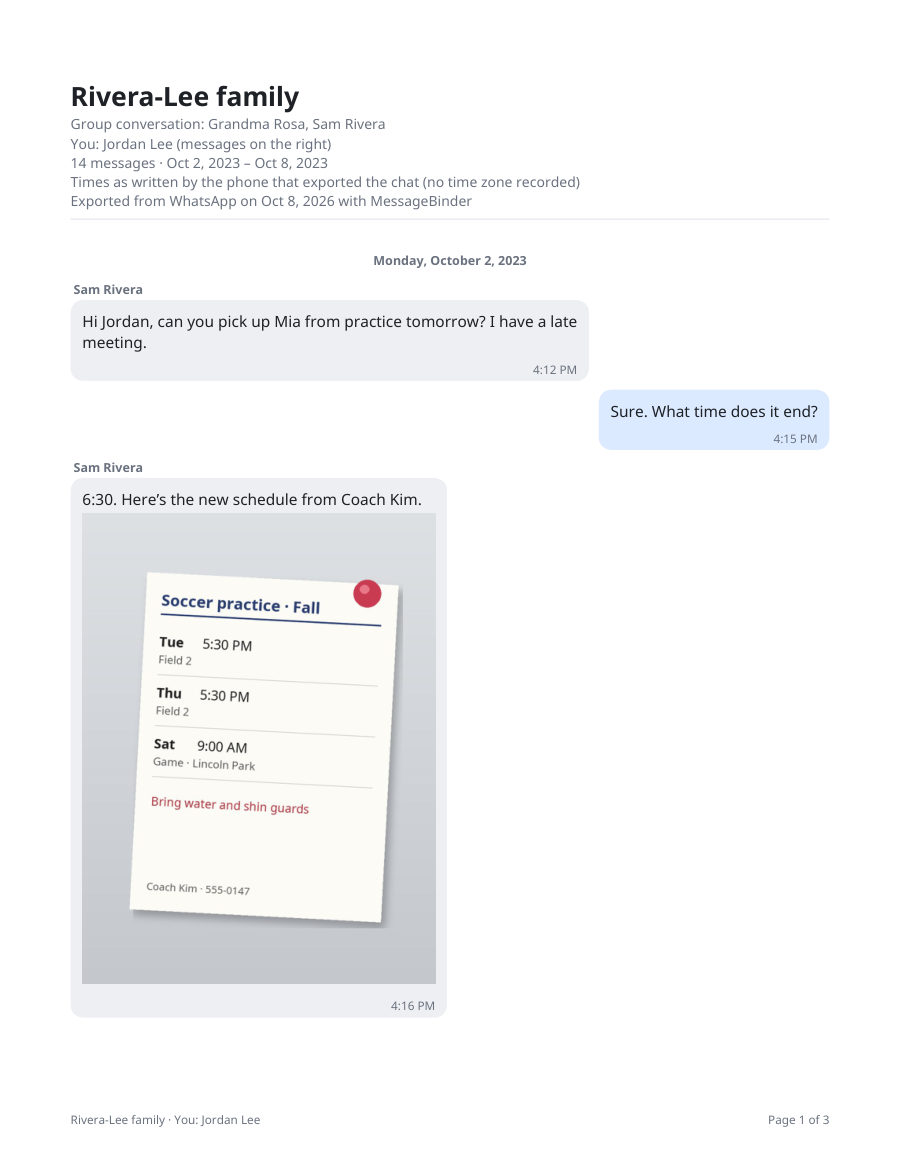
Step 3: save the PDF and print
Click “Save as PDF”: every exported message with its date, time and sender, and the photos where they were sent. One payment of US$14.99, no subscription, covers every chat you add, on up to 5 devices, for every kind of export MessageBinder reads; the key arrives by email. Print the PDF from any printer or attach it to an email. The WhatsApp to PDF page shows each click.
Deciding between the free route and a paid converter? See three ways to save a WhatsApp chat as a PDF, compared.
Only part of the conversation?
The PDF has page numbers and the date above each day, so you can print just the pages for the days you need, and you can tick only the chats you want before saving. The conversation itself is never cut.
MessageBinder is a formatting tool: it reads the export WhatsApp already made and lays it out as a dated PDF. It does not change, add or remove messages; what WhatsApp leaves out of the export (disappearing and view-once messages) is not in the PDF either.
The first button opens the free viewer; add the exported .zip, or the .txt with its photo files, there. The second opens the converter, where the same file becomes a PDF. Nothing is uploaded on either page.
Questions
Does it work for group chats?
Yes. Every message shows who wrote it.
Do the photos appear in the PDF?
Yes, if you exported with media: photos that are in the export appear where they were sent. Videos and voice notes are kept as the original files and shown in the PDF by name and time, not embedded. A photo that was not exported (export without media, Android’s recent-media limit, view once, disappearing) cannot appear: MessageBinder cannot restore anything the export left out.
Can I print from the phone?
Yes: open the viewer in the phone’s browser, save the PDF and share it with your printer app.
Is there a message limit?
WhatsApp limits how many messages one export contains (fewer with media). Everything WhatsApp exports, MessageBinder reads in full.
Is my conversation uploaded anywhere?
Your chat never leaves your browser. Two small things do: anonymous step counts (which page and which step, nothing about you or your file) and, when you enter a license key, the key and a device label sent to the payment provider’s license service to confirm the purchase. The privacy page lists both.
Sources
- WhatsApp Help Center: How to export your chat history
- WhatsApp Help Center: How to export your chat history (Android tab)
- WhatsApp Help Center: How to export your chat history (iPhone tab)
- WhatsApp Help Center: About disappearing messages (not included in exports)
Facts checked against WhatsApp’s help page on 7 November 2026. WhatsApp can change its export; the linked page is the authority, not this one.