Print your chats as a book
Years of messages with someone you love make one of the most personal gifts there is, and your chat never has to be uploaded to make it. Export the chat, turn it into a PDF with the date above each day, the time on every message and the photos in place, and print it at home or at a print shop near you.
The first button opens the WhatsApp converter, the second the converter for iPhone and Mac texts. Add your file there and the preview appears on that page. Nothing is uploaded.
What you need
- The chat: a WhatsApp chat (iPhone or Android), or your iPhone Messages through a computer backup or a Mac.
- A phone or computer with an up-to-date browser. MessageBinder runs in the browser; the chat is never uploaded.
- A printer, or a print shop that binds documents. If the book is for a date, ask the shop how long a bound copy takes.
Step 1: export the chat
- WhatsApp on iPhone: open the chat › tap the contact’s or group’s name › Export chat › With all media › Save to Files.
- WhatsApp on Android: open the chat › ⋮ › More › Export chat › Include media › save the file (for example to Drive or Files).
- iPhone Messages (iMessage and SMS): back up the iPhone to a Mac or Windows PC with encryption turned off, or use the Messages folder on a Mac. The iPhone guide has the steps.
WhatsApp’s help page says “View once” messages are not exported, and an export cannot be put back into WhatsApp: it is a copy for reading and printing.
Step 2: turn it into a dated PDF
To check the chat before you make the book, read it free in the WhatsApp chat viewer (or, for Android texts, the SMS Backup & Restore viewer).
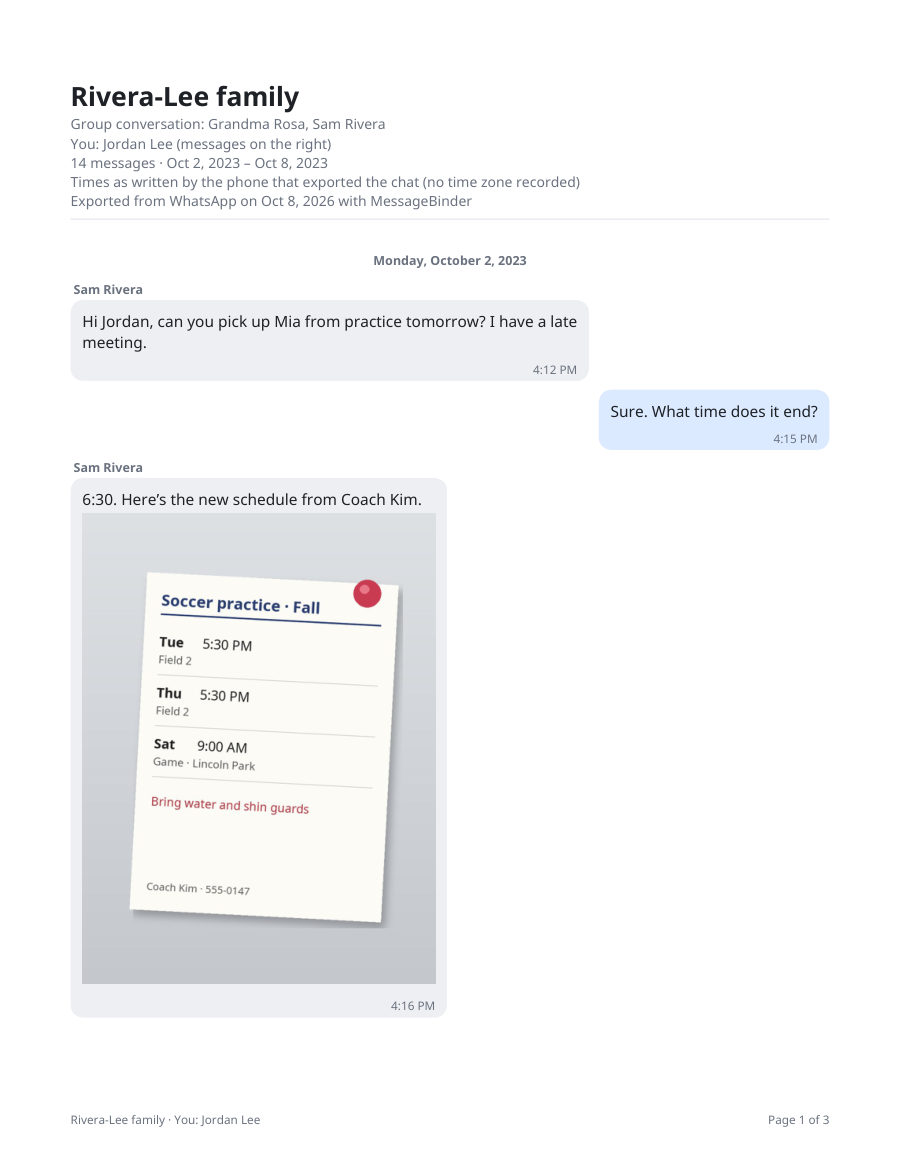
Open the WhatsApp converter (or the converter for iPhone and Mac texts), add your export as it is (no need to unzip a WhatsApp zip) and, for WhatsApp, choose which name is you, so your messages sit on the right like on your phone. You get a PDF for each chat with the date above each day, the sender’s name, the time on every message, each photo next to the message it came with, and “Page N of M” on every page. A very long chat comes as several PDFs (“part 1 of 3”), each with its own page numbers. The preview and a sample PDF of the first 20 messages of each chat are free; the full PDF costs US$14.99 once.
Pay once on Dodo Payments’ checkout, which opens in a new tab; your license key arrives by email; paste it on the converter page to unlock the full PDF.
Photos: on Android, WhatsApp’s help page says “Include media” adds the most recent media, so older photos can be missing from the export; the PDF marks each photo that was not included. iPhone photos in HEIC format are drawn inside the PDF when you use Safari; other browsers show a note and include the photo file.
Step 3: print and bind it
- At home: print the PDF double-sided (it is US Letter size; on A4 paper choose “fit to page”) and put the pages in a ring binder.
- At a print shop: send or bring the PDF and ask for coil (spiral) or comb binding with a clear front cover. Ask for a quote first: a chat of several years can run to hundreds of pages.
- A very long chat: print it in volumes, for example one per year. The PDF is in date order with page numbers, so you can print one page range at a time.
- Color or black and white: the text reads well in black and white; only the photos need color. A black-and-white quote is usually the cheaper one.
Make it a gift
- Choose the chat that tells your story: with a partner, a parent, a best friend, or the family group.
- Add a page of your own on top: a short letter, or the date you first wrote to each other.
- Keep the PDF. You can print another copy any time, or give it as a file.
- A conversation belongs to everyone in it. A chat book is a gift for someone who was part of the chat.
MessageBinder makes the PDF; it does not print or ship books. You print it yourself or at a shop you choose.
The first button opens the WhatsApp converter, the second the converter for iPhone and Mac texts. Add your file there and the preview appears on that page. Nothing is uploaded.
Questions
How many pages will my chat be?
It depends on how much you wrote and how many photos you shared. The converter shows how many messages each chat has, and the free sample shows the page layout with the first 20 messages, so you can estimate the length before you buy or print.
Can I print only one year?
Yes. The PDF is in date order, with a date heading at the start of each day and page numbers, so you can find the page where a year begins and print a page range from there.
What happens to voice notes and videos?
Paper cannot play them, so in the PDF each one appears as a labeled line with its time, and the files themselves come with the download in a folder of attachments.
Is my chat uploaded anywhere?
No. The page reads the file in your browser. Load it, turn off Wi‑Fi, and it still works.
Can I do this with Android texts or Google Voice?
Yes. Android texts come from an SMS Backup & Restore file and Google Voice texts from Google Takeout; both have their own converter on this site, and the PDF looks the same.
Sources
WhatsApp’s export steps checked on 25 October 2026. Apps change their menus; WhatsApp’s help page is the authority.