WhatsApp chats as relationship records for a visa application
If you plan to include a selection of messages between you and your partner in a spouse or partner visa file, this page explains what the official instructions say, how to export a WhatsApp chat, how to turn it into a dated, readable PDF, and how to protect private information while you do it. It is practical information, not legal advice. Requirements differ by program, by application and by your own circumstances.
Start with the official instructions for your application
- United States (USCIS): the Form I-130 instructions and the Form I-751 instructions (editions dated 04/01/24, checked 11 October 2026) list evidence such as joint ownership of property or a joint lease, combined finances, birth certificates of children born to the couple, affidavits from people who know you, and “any other relevant documentation”. They do not name text or chat messages, so whether a selection of messages helps your file depends on your own application.
- Canada (IRCC): use the current official document checklist IMM 5533 for sponsoring a spouse, partner or child. We have not summarized it here; read the current version itself before you print anything.
- United Kingdom (GOV.UK): the family visa guidance lists the information and evidence you must provide (identity, immigration history, finances, English, translations of documents not in English or Welsh) and says you may need other documents depending on your circumstances; it does not describe message records.
- Other programs: use the current official list for your application. Instructions change, and the version an officer uses is the current one, not the one you printed last year.
What a useful message record looks like
- It is clear who wrote each message, with the date and time.
- The messages are in order and readable, not cropped screenshots.
- It is a selection spread across the whole relationship, unless your instructions ask for more.
- Your cover letter says in one line how the pages were produced (for example: exported from WhatsApp with “Export chat”, converted to PDF on my own computer).
- Anything not in the program’s language is translated the way the instructions require. USCIS, for example, asks for a full English translation with a signed statement from the translator that it is complete and accurate.
Export the chat from WhatsApp
- iPhone: open the chat › tap the contact’s name › Export chat › choose “With all media” (photos included) or “Without media” › save to Files.
- Android: open the chat › ⋮ › More › Export chat › choose with or without media › save or share the file.
- You get a .zip (with media) or a .txt file. Keep this original file; you may be asked for it.
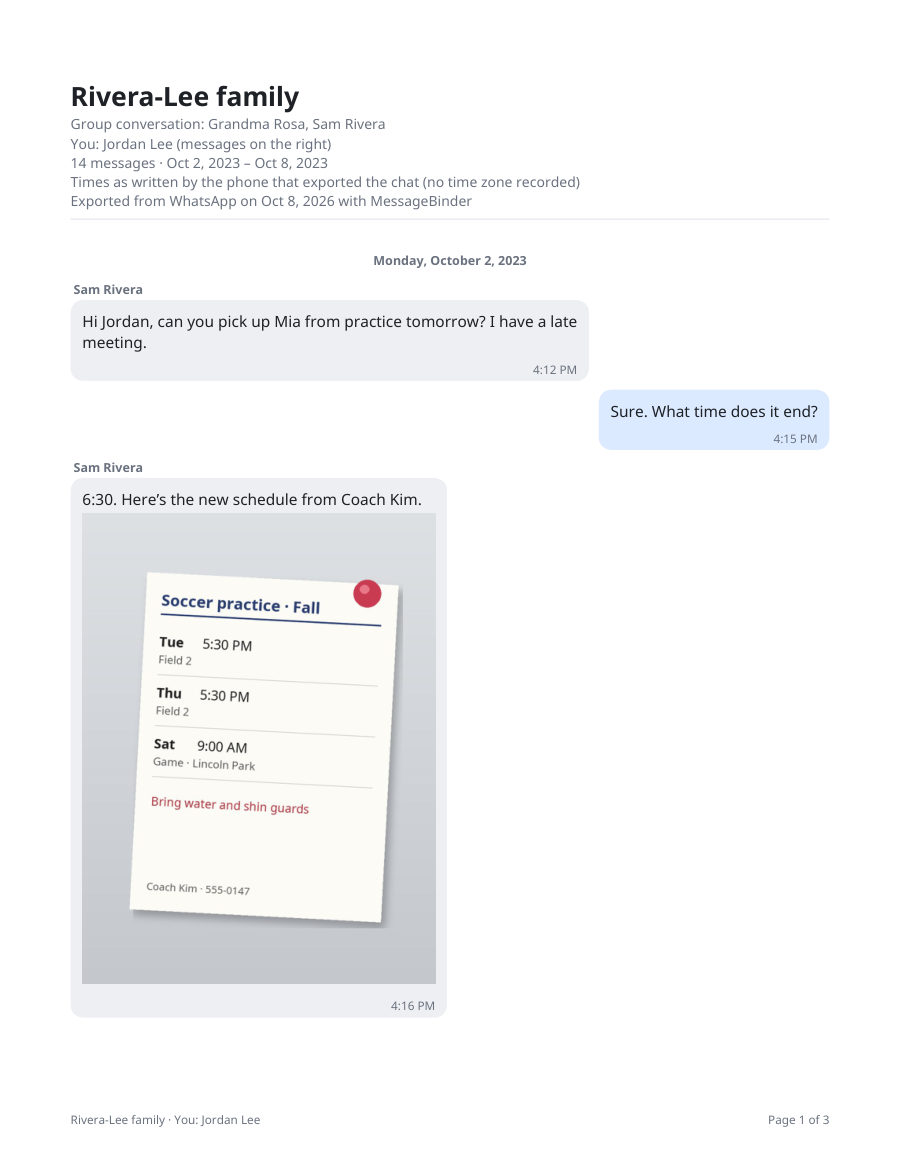
Turn it into a dated PDF and choose your pages (optional tool)
To find the messages and dates you want before choosing pages, read the whole exported chat free in the WhatsApp chat viewer; it shows every message with its date and the photos in place.
MessageBinder reads the exported chat in your browser and makes one PDF per chat (long chats come in parts) with names, dates, times and photos in place, plus a spreadsheet you can filter by month to decide which conversations to print. Nothing is uploaded: the page keeps working with Wi‑Fi off. Previewing and a sample PDF are free; the full export is US$14.99 once.
MessageBinder is a formatting tool, not a legal service. No government has approved any particular converter or layout, and no format guarantees that a document will be accepted. What goes into your file is your decision, based on the official instructions.
Protect private conversation information
- Export only the chats you intend to use, and only when you are ready to prepare the file.
- Keep the original export and your PDFs on your own device or an encrypted drive; avoid emailing whole chat histories or sharing them in group chats.
- Avoid online converters that upload your conversation to a server you do not control. MessageBinder runs in your browser; you can turn Wi‑Fi off after the page loads and it still works.
- Chats often include third people (family, friends). Think about whether their messages need to be in the file. Removing or redacting parts of a conversation can raise questions, so check your program’s instructions before you do.
- Print what you need, then store the digital copies securely and delete the ones you no longer need.
The button opens the WhatsApp converter; add the exported chat (.zip or .txt) there and the preview appears on that page. Nothing is uploaded.
Questions
Do I need to include every message?
The instructions we checked do not say how many messages to include. Unless your program’s instructions ask for more, you can choose a selection spread across the whole relationship.
Can I include the photos we sent each other?
Yes, if you export the chat with media. MessageBinder places each photo next to the message it came with, with the date and time.
My chat is not in English (or the program’s language). What then?
Follow the translation rule of your program. USCIS instructions require a full English translation with the translator’s signed statement that it is complete and accurate. Other programs have their own rules.
Can I delete embarrassing or irrelevant messages first?
Check your program’s instructions before removing anything. A selection of whole conversations is normal; an edited conversation can look altered.
Is this legal advice?
No. It is practical information about exporting and formatting your own messages. Decisions about your application are yours; the official instructions are the authority.
Sources
- USCIS: Instructions for Form I-130 (edition 04/01/24)
- USCIS: Instructions for Form I-751 (edition 04/01/24)
- IRCC: Document checklist IMM 5533 (sponsoring a spouse, partner or child)
- GOV.UK: Family visas, information and evidence you must provide
Official instructions checked on 11 October 2026. They change; the linked pages are the authority, not this one.