Google Voice number expiring or reclaimed? Keep your texts first
A plain reading of Google’s inactivity rule for the no-charge personal Google Voice plan: who it applies to, what the warning means for the number and for the messages behind it, and how to export everything first. Checked against Google’s own help pages on 31 October 2026.
Who this applies to
Google Voice comes in several account types, and they are not treated the same way. Google’s Acceptable Use Policy says Google may reclaim a Voice number that does not appear to be in use, “such as placing calls or sending text messages for a period of 3 months”. The paid Google Voice Starter ($10 a month) and Standard ($20 a month) plans sold through Google Workspace state that the number will not be reclaimed due to inactivity, and Voice for Google Workspace accounts given to you by a workplace or school are managed and paid for by that organization. If you use the no-charge personal plan, the inactivity rule is the one to know about. Google’s page on subscription types tells you which plan you have.
What the warning means (no-charge personal plan)
According to Google’s help page, on the no-charge personal plan you get a warning that the number will be removed, together with a “reclaim date”. Before that date, any of these keeps the number: make a call, send a text from your Voice number, or listen to your voicemail. After the reclaim date, Google says you have 45 days to add the number back to your account.
Nothing on this page keeps a number active; only using it does, or a plan that says it will not be reclaimed. MessageBinder does not prevent a reclaim and does not change what Google exports. It only formats the export you already own.
Losing the number is not the same as losing your messages
Google’s help page is explicit: “After your number is reclaimed, your messages are still in your Voice account, but you can’t get calls or texts.” The reclaim takes the phone number; it does not delete the texts, call history or voicemails behind it. What does remove your access is deleting the Voice number yourself, deleting the Google Account, or losing the account for another reason. Porting the number out starts with unlocking it in Google Voice; export before you begin, so that you hold a copy whatever happens next.
Export everything while it is in the account (about 10 minutes)
- Go to takeout.google.com and sign in with the account that has the Voice number.
- Click “Deselect all”, scroll down and tick only “Voice”.
- Next step › Export once › .zip › 50 GB (larger archives may still be split) › Create export.
- Wait for Google’s email (a few minutes to a few days; most people get it the same day) and download the zip while the link lasts, about 7 days. Keep it: it is the one copy you control.
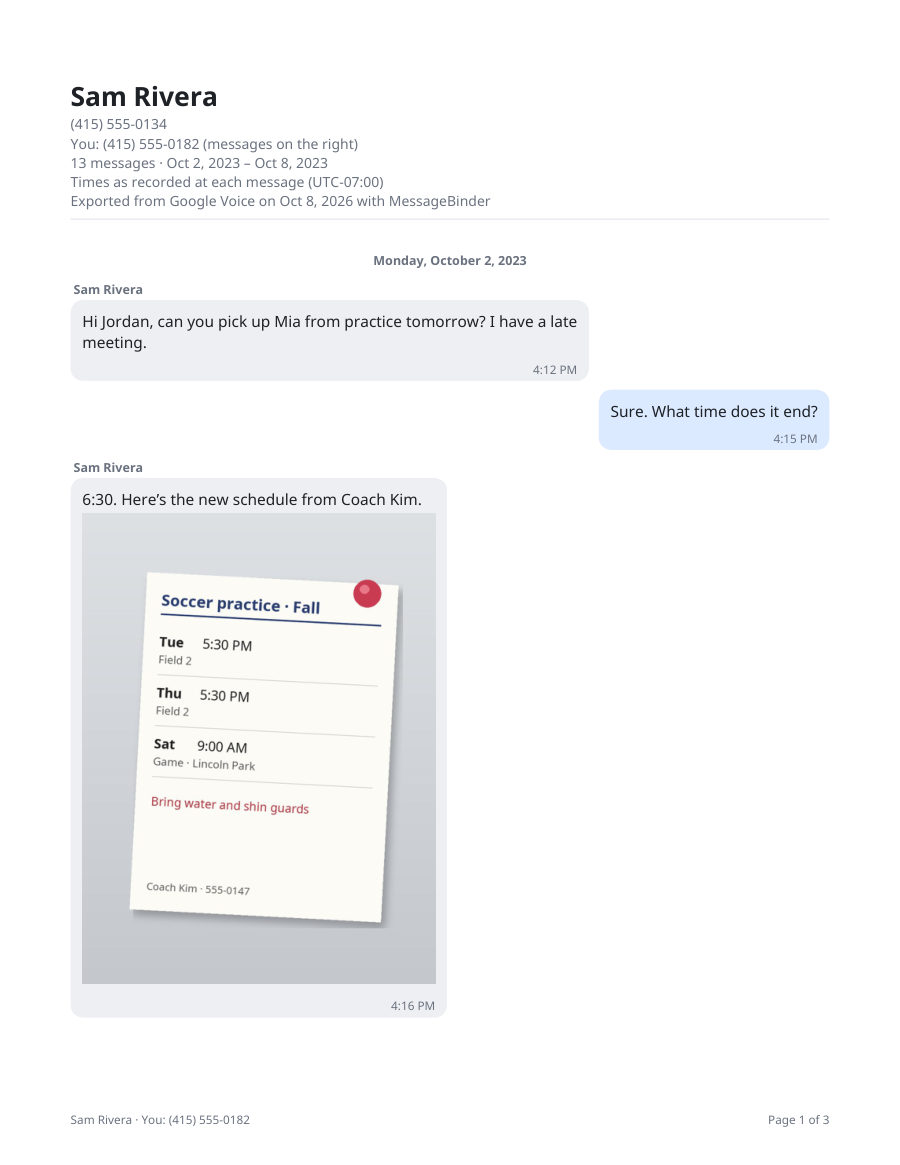
Google says the export includes your call logs, text messages, voicemails and voicemail transcripts, voicemail greetings, billing history, your Voice number and service address (Export your Voice data); work or school accounts may get less. In practice the texts arrive as many small web pages, one per contact per day, with the photos and audio files beside them.
Make it readable (optional)
MessageBinder turns the Takeout zip into one dated PDF per contact (long chats come in parts) with the photos in place, a spreadsheet of every message, a spreadsheet of calls and voicemails with the transcripts, and your voicemail audio in a folder. It runs in your browser: the zip is never uploaded, and the page keeps working with Wi‑Fi off. Previewing your conversations and a sample PDF are free; the full export is US$14.99 once. To read every text on screen first, open the zip in the free Google Voice Takeout viewer.
If you are leaving Google Voice on purpose
- Porting the number to another carrier: Google’s porting page says you first unlock the number in Voice. Export before you unlock.
- Deleting the number or closing the account: export first; afterwards there is nothing left to export.
- Moving to a paid plan: check Google’s plan pages for what carries over, and export first anyway.
The first button opens the Google Voice converter; add the Takeout zip there and the preview appears on that page. Nothing is uploaded.
Questions
How long can a Google Voice number be inactive before Google reclaims it?
Google’s Acceptable Use Policy says Google may reclaim your Voice number if you do not appear to be making use of the service as it was intended “for a period of 3 months”; on the no-charge personal plan you get a warning with a reclaim date first, and before that date a call, a text sent from the number or listening to your voicemail keeps it. After the reclaim date, Google’s “Reclaim your Voice number” page says you have 45 days to get the number back. Exporting first keeps your messages whatever happens to the number.
Does the export include deleted messages?
No. Only what Google Voice still holds is in the Takeout file.
My number was already reclaimed. Are the texts gone?
Google’s help page says your messages are still in your Voice account after a reclaim; only calls and texts to that number stop. Export now, then decide about adding the number back within Google’s 45-day window.
Is any of this urgent?
Only the reclaim date Google shows you on the no-charge personal plan, and only if you still want the number. If you use the number, nothing changes; paid plans say they do not reclaim for inactivity. Your messages are not deleted by the reclaim itself.
What happens to voicemails?
They come out of Takeout as audio files with transcripts. MessageBinder puts the transcripts in the calls spreadsheet and the audio files in a folder.
Is a PDF enough?
MessageBinder gives you a dated, readable copy of your own data. If the person or office asking for your messages wants a set format, ask them which one. This page is not legal advice.
Sources
- Google Voice Help: Reclaim your Voice number
- Google Voice Acceptable Use Policy (account inactivity)
- Google Voice Help: Export your Voice data
- Google Voice Help: Identify Google Voice subscription types
- Google Voice Help: Port your Google Voice number
- Google Workspace: Google Voice plans and prices
Facts checked against the linked Google pages on 11 October 2026. Google can change its policies and prices; the linked pages are the authority, not this one.